Desktop App · Windows & macOS · Free
Caldwell Catalog Builder icon

Caldwell Catalog Builder

A free desktop application for planning and logging sessions across all 109 Caldwell objects, entirely offline on your own computer. It's the companion to the Messier and Sharpless Catalog Builders, built the same way.

Download freeBrowse all tools

The Caldwell Catalog Builder is a free desktop app for planning and logging your sessions across all 109 objects in the Caldwell catalog — the list Patrick Moore put together to cover the bright deep-sky objects Messier's catalog left out. Most of the list sits in the northern sky and is well within reach from across North America and Europe, with a handful of southern objects needing more southerly latitudes.

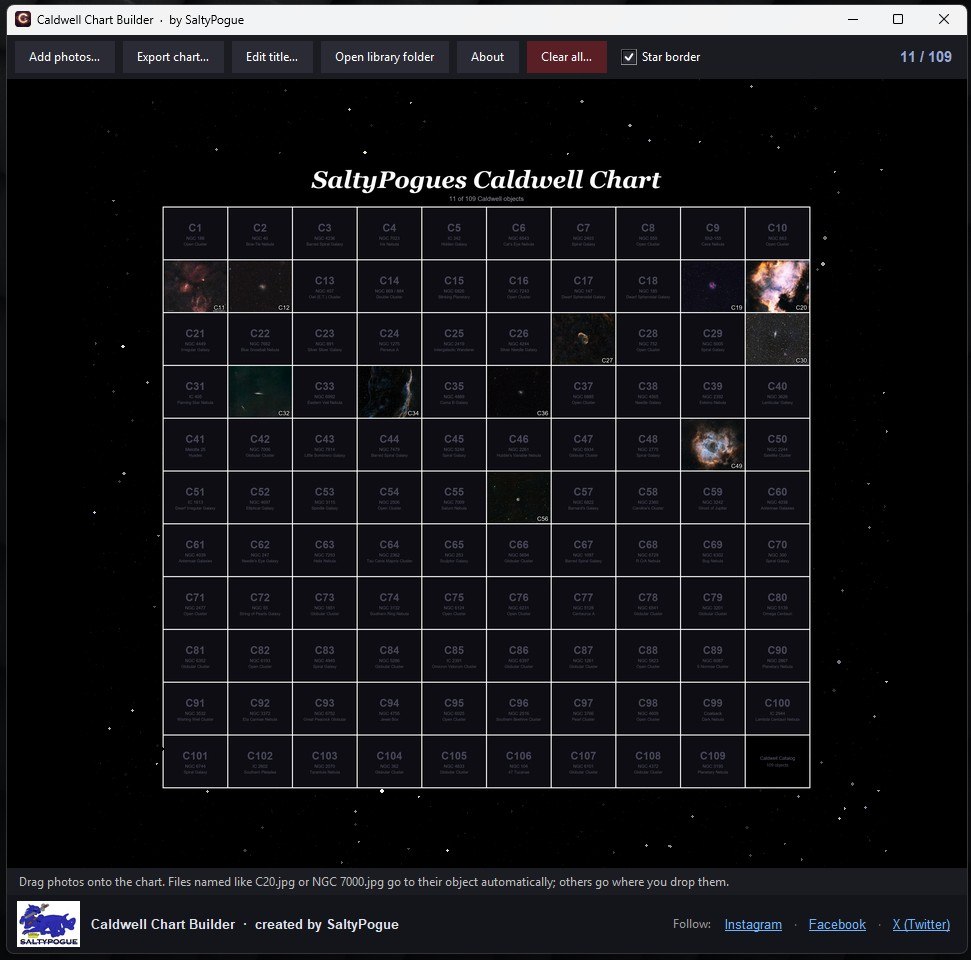
It lays the whole catalog out as one chart with a toolbar for adding photos, exporting the finished chart as an image, editing the title, and opening your library folder directly. A live counter in the corner (like the 11/109 shown below) tracks how many objects you've filled in.

For each object you can log your exposure time, sub-length and count, gain, and the equipment you used, along with your own notes, so you build up a complete record of what you've imaged and how you shot it.

Like its companions, it's a native desktop application that runs entirely offline on your own machine — your logs never leave your computer. Available for Windows and macOS (both Apple Silicon and Intel). It's the direct companion to the Messier and Sharpless Catalog Builders, so if you're working through more than one list, the workflow stays identical across all three.
Screenshots

The Caldwell Chart Builder app
The Caldwell Chart Builder appThe full app window — add photos, export, and track your progress.
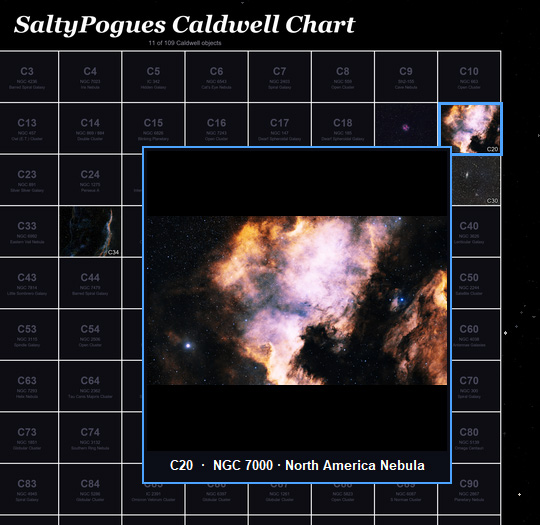
Close-up on the chart
Close-up on the chartEach tile fills in as you drag your own captures onto it.

Frequently asked questions

Is it really free?

Yes, completely free with no account, sign-up or subscription.

Does it need an internet connection?

No. Once installed, it runs entirely offline on your own computer. An internet connection is only needed to download it in the first place.

Where is my session data stored?

Everything you log is saved locally on your own computer. Nothing is uploaded to a server, and your data is yours to back up however you like.

I'm on Windows and my antivirus flagged the .exe — is it safe?

Yes. Some antivirus tools flag any new or less common .exe file as a false positive, simply because it hasn't built up a reputation yet. The app doesn't access the internet or collect any data.

I'm on a Mac and it says the developer can't be verified — what do I do?

macOS blocks apps that haven't been notarized by Apple by default. Right-click (or Control-click) the app and choose Open once — after that, it'll launch normally.

What exactly does it log for each object?

Exposure time, sub-length and count, gain, your equipment, and your own notes — everything you'd want to look back on when you revisit a target.

What's the Caldwell catalog, and how is it different from Messier?

The 109 objects Patrick Moore catalogued to round out the Messier list with bright deep-sky targets Messier missed — including many only visible from the southern hemisphere. Together, Messier and Caldwell cover almost every well-known naked-eye-reachable deep-sky object.

How do I get my photos onto the chart?

Drag them straight onto the grid from the toolbar's Add Photos button, or drop files onto the window. Name a file like C20.jpg or NGC 7000.jpg and it finds its own tile automatically; anything else goes wherever you drop it.

Ready to start logging sessions?

Free, offline, and your data stays on your computer.

Get the PDF Checklist Companion
Version 1.3 · Updated November 2026
cards
Powered by paypal